1
2
3
4
5
6
7
8
9
10
11
12
13
14
15
16
17
18
19
20
21
22
23
24
25
26
27
28
29
30
31
32
33
34
35
36
37
38
39
40
41
42
43
44
45
46
47
48
49
50
51
52
53
54
55
56
57
58
59
60
61
62
63
64
65
66
67
68
69
70
71
72
73
74
75
76
77
78
79
80
| import hashlib
from PIL import Image
import numpy as np
def decode_frames(frame_prefix, frame_count, width=256, height=256):
channels = ['R', 'G', 'B']
bit_position = 4
data_bits = []
for frame_idx in range(1, frame_count + 1):
frame_path = f"{frame_prefix}{frame_idx:04d}.png"
frame = Image.open(frame_path)
frame = frame.convert("RGB")
pixels = np.array(frame)
r_channel = (pixels[:, :, 0] & (0b11 << bit_position)) >> bit_position
g_channel = (pixels[:, :, 1] & (0b11 << bit_position)) >> bit_position
b_channel = (pixels[:, :, 2] & (0b11 << bit_position)) >> bit_position
for bits in r_channel.flatten():
data_bits.append(format(bits, '02b'))
for bits in g_channel.flatten():
data_bits.append(format(bits, '02b'))
for bits in b_channel.flatten():
data_bits.append(format(bits, '02b'))
return ''.join(data_bits)
def check_padding(data_bits, width, height):
size = 6 * width * height
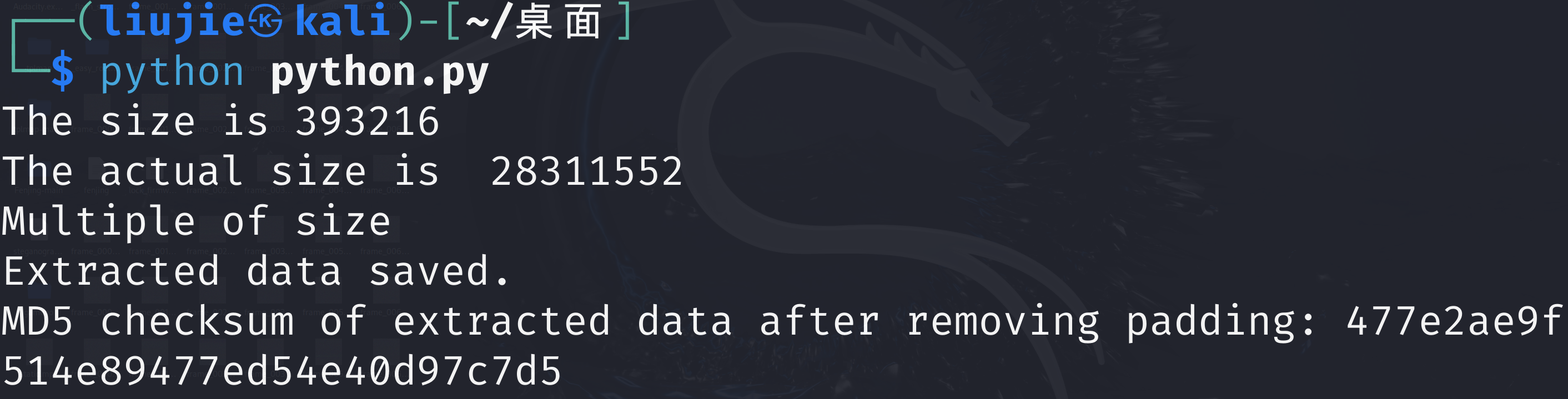
print("The size is", size)
actual_size = len(data_bits)
print('The actual size is ', actual_size)
if actual_size % size == 0:
print("Multiple of size")
return data_bits
padding_size = actual_size % size
data_bits = data_bits[:-padding_size]
return data_bits
def bits_to_bytes(data_bits):
byte_arr = bytearray()
for i in range(0, len(data_bits), 8):
byte = data_bits[i:i+8]
byte_arr.append(int(byte, 2))
return bytes(byte_arr)
def calculate_md5(data):
md5 = hashlib.md5(data).hexdigest()
return md5
frame_prefix = 'frame_'
frame_count = 72
width = 256
height = 256
data_bits = decode_frames(frame_prefix, frame_count, width, height)
data_bits = check_padding(data_bits, width, height)
compressed_data = bits_to_bytes(data_bits)
output_path = 'extracted_data.bin'
with open(output_path, 'wb') as f:
f.write(compressed_data)
print("Extracted data saved.")
calculated_md5 = calculate_md5(compressed_data)
print(f"MD5 checksum of extracted data after removing padding: {calculated_md5}")
|